
What does the Analytics page show?
Analytics shows how shoppers use your feed. On Free it shows the last 7 days, with a 30 days with Pro link. On Pro, pick Last 7 days or Last 30 days at the top.
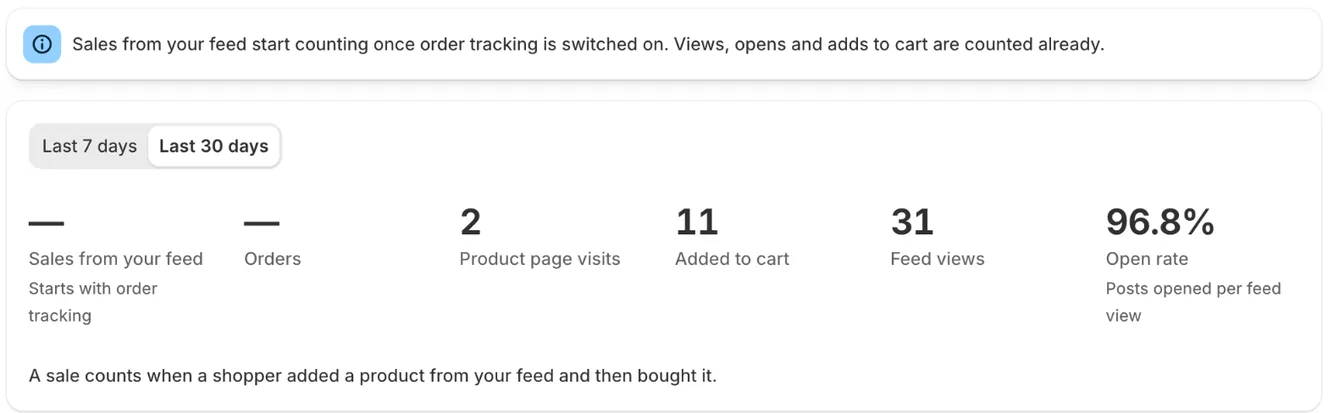
The numbers
Section titled “The numbers”- Sales from your feed and Orders: orders with a product added from your feed. These need sales tracking turned on (below).
- Product page visits: clicks from the popup to a product page. Shoppers usually add to cart in the popup, so these aren’t a step in the funnel.
- Added to cart: products added to the cart from the popup.
- Feed views: page views where the feed came into view.
- Open rate: posts opened per feed view.
A sale counts when a shopper added a product from your feed and then bought it.
Sections
Section titled “Sections”- Trends (Pro): a daily chart of feed views, posts opened, adds to cart and sales.
- From view to cart (Pro): Feed views → Posts opened → Added to cart, with the share who reach the next step. With sales tracking on, it’s From view to order and ends at the order.
- Your best posts (Pro): your top 20 posts with opens, product visits and adds to cart. With sales tracking on, it’s called Which posts sell and adds a Sales column (sales per post are on Pro). Stats from posts that are no longer on Instagram show as Removed post.
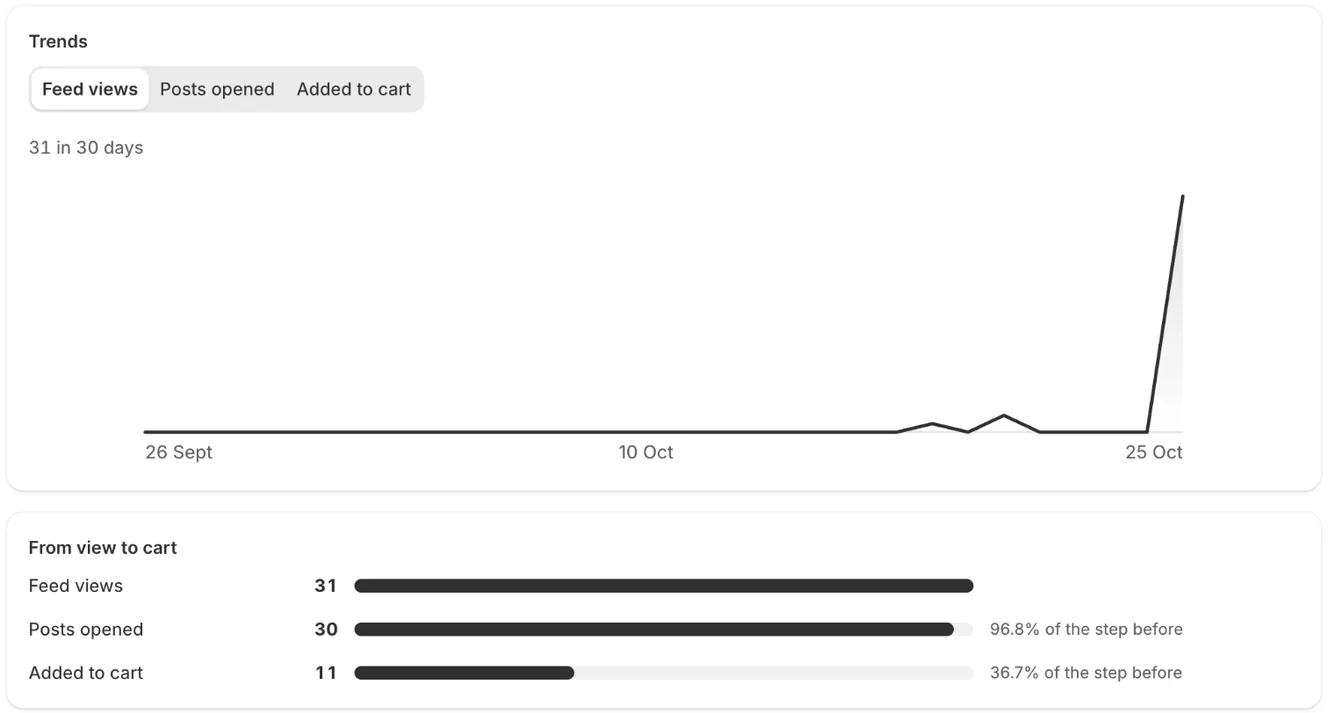
- Note: On Free, Trends, the funnel and Your best posts show a blurred preview with a Start 7-day free trial or Upgrade to Pro button. The totals at the top are always shown.
- Note: Your own visits in the theme editor aren’t counted.
- Note: To see sales, click Turn on sales tracking at the top of Analytics and approve it in Shopify’s dialog. The app keeps only order totals and which posts led to them, never customer details. Until then the sales tiles show —. Views, opens and adds to cart are counted from day one; sales count from the moment you turn tracking on.
- Note: Home shows the same totals, for the last 7 days on Free (Last 7 days) and 30 days on Pro (Last 30 days), with a link to this page.
Related articles
Section titled “Related articles”Still having trouble? Contact us from Support inside Zegsu Instafeed and we’ll help you directly.