
How do tiers and discounts work?
Each tier has a quantity and a discount. When a customer has at least that many items in the cart, the discount applies automatically. If several tiers are reached, the one with the highest quantity wins.
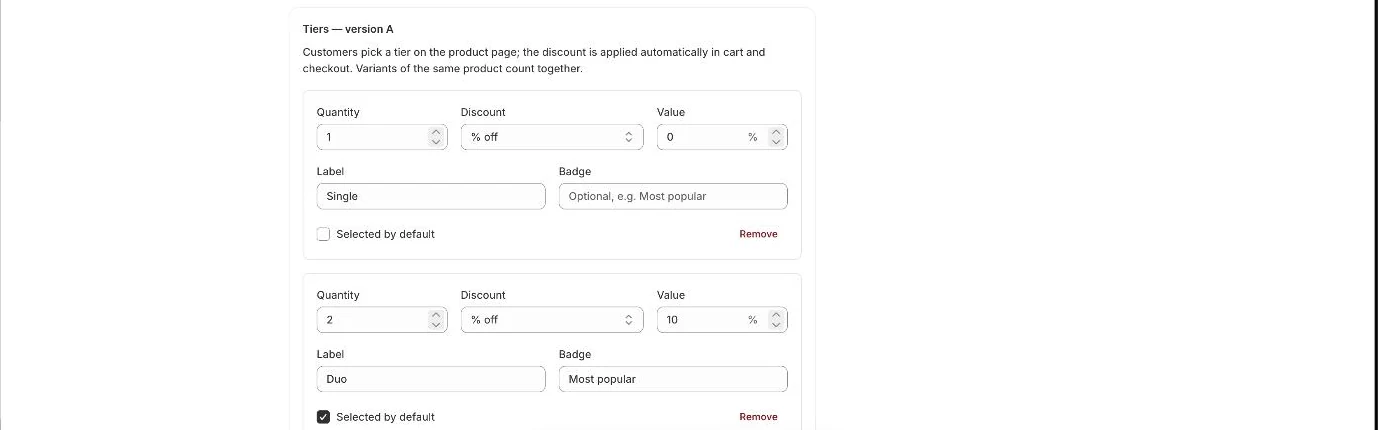
Tier fields
Section titled “Tier fields”- Quantity: how many items the tier needs. For free items this is the total, including the free ones.
- Discount: % off, Amount off each, or Free items.
- Value: the percentage, the amount per item (in your store currency), or the number of free items.
- Label and Badge: the text customers see, for example “2 items” and “Recommended”.
- Selected by default: the tier that is pre-selected on the product page.
- Open your offer from the Offers page.
- Edit the tiers in the Tiers section.
- Click Add tier to add another, or Remove to delete one.
- Click Save.
- Note: A tier with a value of 0 gives no discount. Use it for a “1 item” option.
- Note: Variants of the same product count together. In a mix & match pack, every product in the pack counts together.
- Note: Buying more than the top tier still gets the top tier’s discount.
- Note: Amount off each comes off every item in the tier, but never more than the item’s price.
- Note: Percentage discounts are rounded down per item, to the smallest currency unit. Totals can be a few cents lower than a simple calculation.
- Note: With Free items, the cheapest items in the tier are the free ones.
- Note: Offer discounts combine with your other discounts.
- Note: If the offer has rules, they are checked again at checkout before the discount applies.
Related articles
Section titled “Related articles”- How do I create a quantity break offer?
- How do I create a Buy X, get Y free offer?
- How do I let customers pick different variants in one tier?
- Why is the offer discount not applied in the cart or checkout?
- What do the offer error messages mean?
Still having trouble? Contact us from Support inside Zegsu Upsell and we’ll help you directly.