
What does the Analytics page show?
The Analytics page shows how much your Zegsu offers earn and how shoppers interact with them. You can view the last 7, 30 or 90 days. Your Home page also shows a short summary of the last 30 days.
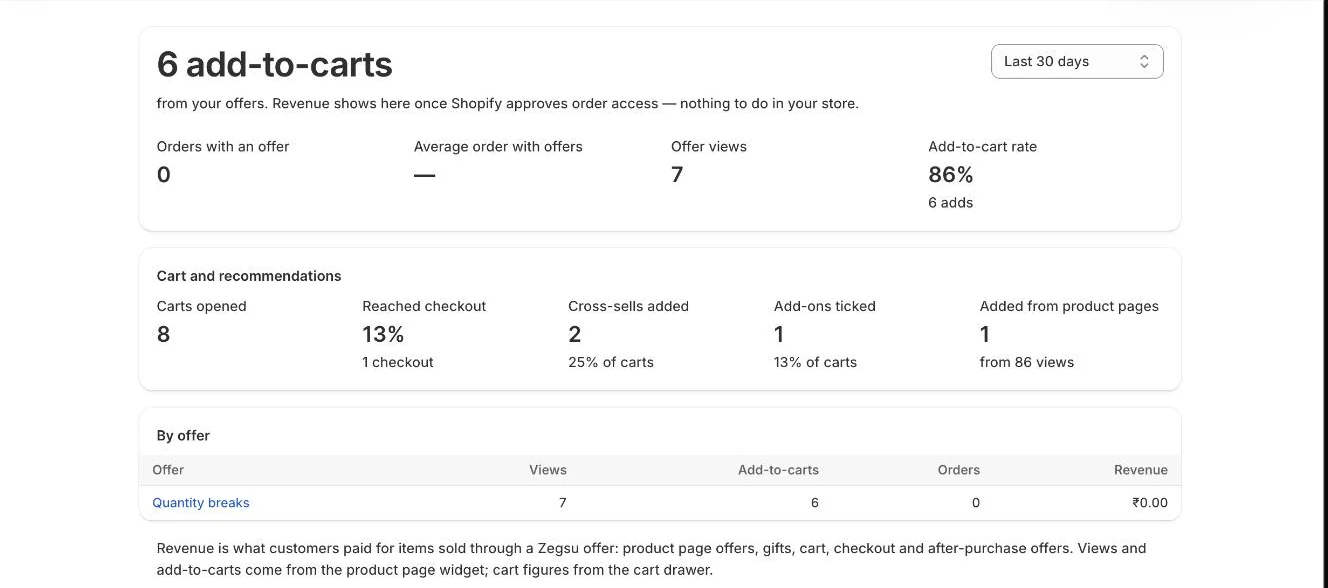
- Open Zegsu Upsell and click Analytics in the app menu.
- Choose a Period at the top right: Last 7 days, Last 30 days or Last 90 days. The page opens on 30 days.
- Read the headline figure and the four figures under it (explained below). When there is revenue, a daily revenue chart shows too.
- Scroll to Cart and recommendations to see cart drawer activity.
- Use the By offer table to compare each offer. Click an offer’s name to open and edit it.
What each figure means
Section titled “What each figure means”- Headline: the amount paid for items sold through a Zegsu offer, after discounts. Until Shopify approves order access, it shows add-to-carts from your offers instead.
- Orders with an offer: orders that included at least one offer item, and their share of all your orders.
- Average order with offers: the average order total when an offer was used, compared with orders that had no offer.
- Offer views and Add-to-cart rate: views of the product page offer widget, and adds divided by views.
- Cart and recommendations: Carts opened (the cart drawer opened with items in it), Reached checkout, Cross-sells added, Add-ons ticked and Added from product pages (product page recommendations).
- By offer: Views, Add-to-carts, Orders and Revenue for each offer.
What counts as offer revenue
Section titled “What counts as offer revenue”An item counts toward an offer when it was sold through one of these:
- A product page offer’s discount (quantity breaks, bundles, mix & match packs, buy X get Y).
- A free gift from a gift offer, or a cart reward gift.
- A product added from the cart’s recommendations (Cart cross-sells) or a ticked add-on (Cart add-ons & one-tick offers).
- The Checkout order bump, the Thank-you page offer discount code, or an After-payment upsell.
- Note: Order revenue appears only after Shopify approves the app to read orders. Until then the headline shows add-to-carts with the note “Revenue shows here once Shopify approves order access”. Widget views, add-to-carts and cart activity are still counted.
- Note: A view counts when the offer widget actually scrolls into sight on the page. Views and adds are not counted while the browser tab is in the background.
- Note: The Cart and recommendations section only fills in once shoppers use the cart drawer.
- Note: If you delete an offer, its past results stay in the table under Deleted offer.
- Note: For A/B test results per version, open the offer itself.
Related articles
Section titled “Related articles”- Why is revenue showing zero?
- How do I see orders that used an offer?
- How do I A/B test an offer?
- How do I turn on the cart drawer?
- What limits apply to offers and settings?
Still having trouble? Contact us from Support inside Zegsu Upsell and we’ll help you directly.