
What extras can I add to the cart drawer?
The Extras section on the Cart page has optional features for your cart. Each one is a switch, and its settings appear once you turn it on. Click Save in the save bar after changes.
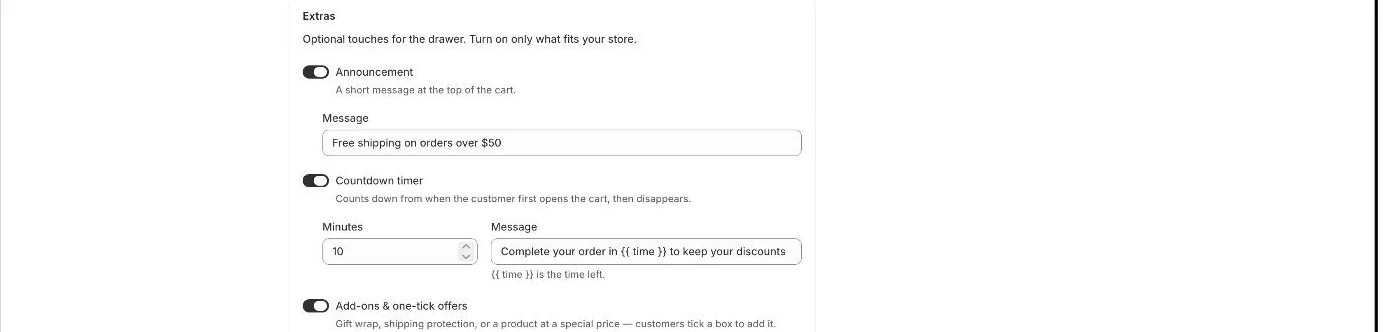
- Announcement: a short message at the top of the cart.
- Countdown timer: counts down from when the customer first opens the cart, then disappears. Set Minutes (1–60) and a Message; [time] is the time left; click Time left to insert it.
- Add-ons & one-tick offers: up to 2 products such as gift wrap or shipping protection that customers add with a tick box, optionally at a discount. See How do I add gift wrap, shipping protection or a one-tick offer to the cart?.
- Discount code field: customers can apply a code before checkout. Codes that cannot be used are rejected with “This code can’t be used with your cart.”
- Terms checkbox: customers must tick it before they can check out. Set the Text and Link to terms.
- Age verification: customers confirm their age before they can check out, for alcohol, vapes and similar.
- Sale badges: a “Sale” tag on items priced below their compare-at price.
- Trust badges: reassurance under the checkout button. Add an optional Message and tick Show payment icons to show the payment methods your store accepts.
- Sticky cart button: a floating cart button with the item count, on every page. Choose Bottom right or Bottom left.
- Empty cart: a custom Message (leave empty for the standard message in the customer’s language) and Show your picks in an empty cart, which shows up to 3 products from Recommendations → Your picks with an Add button.
- Note: Sale badges only appear when the product has a compare-at price set in Shopify that is higher than its price.
- Note: The countdown timer starts once per visit, the first time the cart shows items.
- Note: If Discount your picks is on, picks in an empty cart show the discounted price.
- Note: You can move the add-ons block and the banner/announcement/timer block with Section order in the Design section.
Related articles
Section titled “Related articles”- Why does the cart say “This code can’t be used with your cart.”?
- How do I change how the cart drawer looks?
- What does the Zegsu cart drawer do?
- How do I translate the app into other languages?
Still having trouble? Contact us from Support inside Zegsu Upsell and we’ll help you directly.