
How do I set up cart rewards like free shipping, % off or a free gift?
You set up cart rewards in the Rewards section of the Cart page. You can add up to 3 rewards: free shipping, a % off the order or a free gift. A progress bar in the cart shows customers how close they are to the next reward. Rewards apply automatically at checkout, so you do not need discount codes or changes to your shipping settings.
-
Open the app and go to Cart.
-
Turn on Reward customers for spending more in the Rewards section.
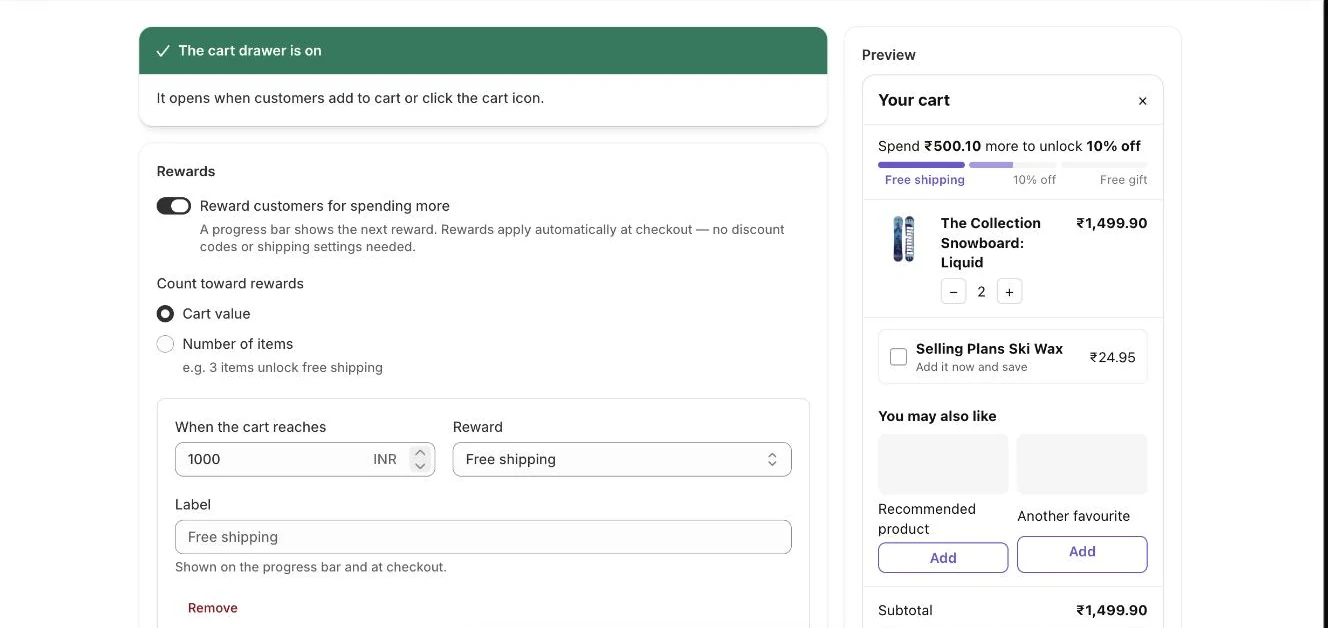
Cart page: rewards settings with a live preview of the drawer -
Choose what counts under Count toward rewards: Cart value or Number of items.
-
Set the threshold in When the cart reaches (or When the cart has for items), then pick a Reward: Free shipping, % off the order or Free gift.
-
For % off the order, enter the Percentage off. For Free gift, click Choose gift and pick the product.
-
Optionally type a Label. It shows on the progress bar and at checkout.
-
Click Add reward to add another tier (up to 3), and edit the Progress message and Message when every reward is unlocked if you like.
-
Click Save in the save bar.
- Note: In Progress message, [amount] is the amount still needed and [reward] is the next reward. Click Amount left or Next reward under the field to insert one.
- Note: Thresholds count the cart before discounts. Free gifts do not count toward the total.
- Note: A free gift is added to the cart automatically once the cart qualifies, and removed if the cart drops below the threshold. Only one unit is free; extra units are charged.
- Note: If a customer removes the free gift, it is not added back during that visit.
- Note: If you reach more than one % off reward, only the highest percentage applies.
- Note: The app creates an automatic discount called “Cart rewards (Zegsu Upsell)” in your Shopify Discounts. Leave it active. If it is deleted, it is created again the next time you save the Cart drawer page.
- Note: The rewards bar appears only when the cart drawer is turned on in your theme. See How do I turn on the cart drawer?.
- Note: A free gift reward must have a product chosen. A tier without a gift product is ignored.
Related articles
Section titled “Related articles”- What does the Zegsu cart drawer do?
- How do I give a free gift with purchase?
- Why is the offer discount not applied in the cart or checkout?
- What limits apply to offers and settings?
Still having trouble? Contact us from Support inside Zegsu Upsell and we’ll help you directly.