
How do I turn on the cart drawer?
Turn on the Zegsu cart drawer app embed in your theme. The app does this for you in one click; you only need to press Save in the theme editor.
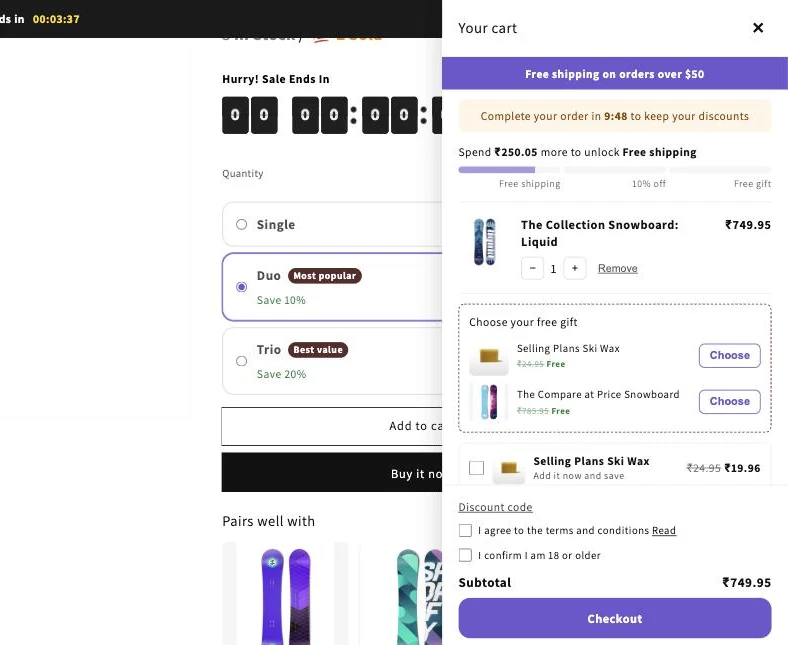
- Open Cart in the app menu.
- Click Turn on cart drawer in the blue banner at the top. Your theme editor opens in a new tab with the drawer switched on.
- Click Save in the theme editor.
- Return to the app and click I’ve done this. The banner changes to The cart drawer is on.
- Set up rewards, recommendations, extras and design on the Cart page, then click Save.
- Note: The drawer replaces your theme’s own cart. It opens when customers add to cart or click the cart icon.
- Note: Free gifts, cart rewards, cart extras and discounted recommendations need the cart drawer to be on.
- Note: You can also turn it on yourself: in the theme editor, open App embeds and switch on Zegsu cart drawer.
- Note: The app checks your published theme only.
Related articles
Section titled “Related articles”- What does the Zegsu cart drawer do?
- Why is the Zegsu cart drawer not showing on my store?
- How do I set up cart rewards like free shipping, % off or a free gift?
- How do I change how the cart drawer looks?
- How do I give a free gift with purchase?
Still having trouble? Contact us from Support inside Zegsu Upsell and we’ll help you directly.