
What does the Zegsu cart drawer do?
The Zegsu cart drawer is a slide-out cart that replaces your theme’s own cart drawer or add-to-cart popup. It opens when a customer adds something to the cart or clicks the cart icon. You set it up on the Cart page in the app.
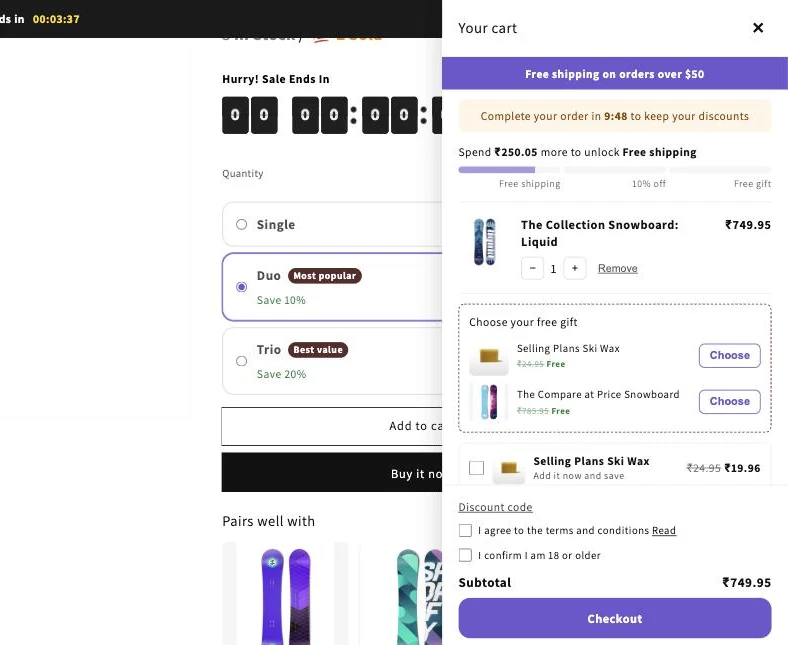
The drawer can show:
- Rewards: a progress bar that unlocks free shipping, a % off the order or a free gift. Rewards apply automatically at checkout.
- Recommendations: products customers can add in one click, with an optional discount on your own picks.
- Extras: an announcement, a countdown timer, add-ons such as gift wrap, a discount code field, terms and age checkboxes, sale badges, trust badges, a sticky cart button and an empty cart message.
- Design options: Side panel or Floating card, Light or Dark, section order, a banner image and custom CSS.
- Text: your own Drawer title and Checkout button label.
Customers can change quantities, remove items and see their savings and subtotal before they press the checkout button.
Note: The drawer only appears on your store after you turn on the Zegsu cart drawer app embed in your theme editor. See How do I turn on the cart drawer?. Note: The drawer uses your brand colours and corner radius from the Settings page. Note: The app is free, so every cart drawer feature is available to you.
Related articles
Section titled “Related articles”- How do I set up cart rewards like free shipping, % off or a free gift?
- How do I show product recommendations in the cart drawer?
- What extras can I add to the cart drawer?
- How do I change how the cart drawer looks?
- Why is the Zegsu cart drawer not showing on my store?
Still having trouble? Contact us from Support inside Zegsu Upsell and we’ll help you directly.