
How do I add an offer to the thank-you page?
The thank-you page offer shows one product with a discount right after your customer pays. The button adds the product to a new cart with the discount code applied. It works on every Shopify plan. The app creates the discount code for you, and each customer can use it once.
-
Open Zegsu Upsell and go to the Checkout page.
-
In After purchase: thank-you page offer, switch on Show a thank-you page offer.
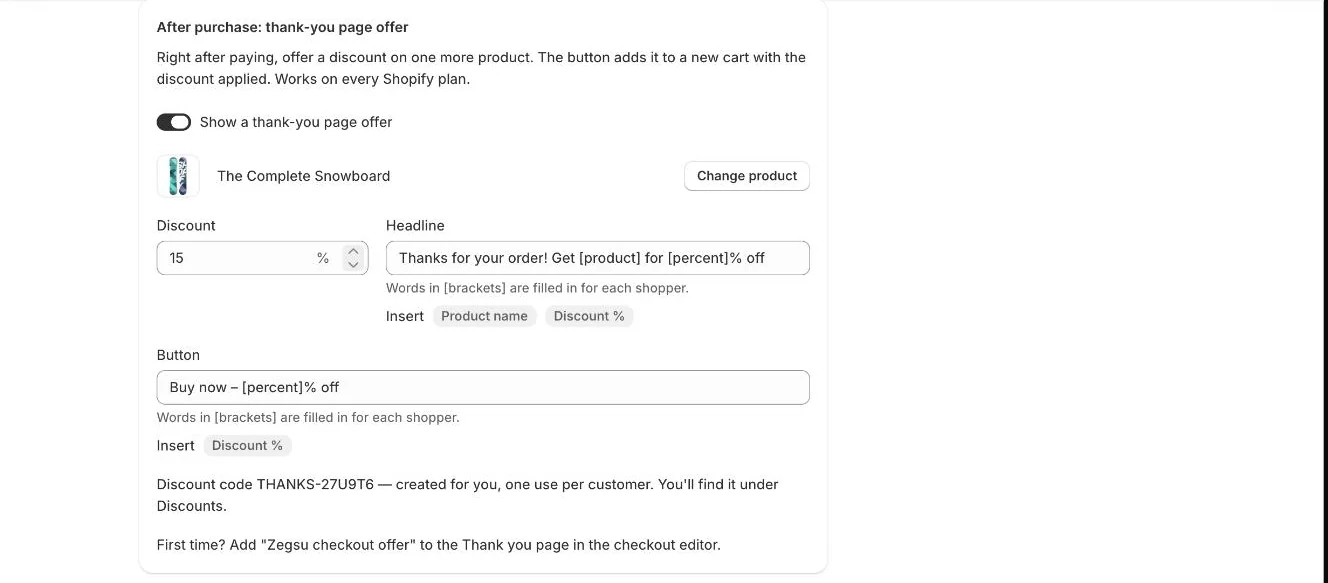
After purchase: thank-you page offer with its product, discount, headline, button and code -
Click Choose product and pick the product to offer.
-
Enter a Discount percentage (1–100).
-
Edit the Headline and Button text. Words in brackets, like [product] and [percent], are filled in for each customer. Click Product name or Discount % under a field to insert one.
-
Click Save. The page then shows your discount code, for example “Discount code THANKS-… — created for you, one use per customer.”
-
First time only: in Shopify’s checkout editor, switch to the Thank you page, add the Zegsu checkout offer block, and save.
-
Place a test order to check the offer on the thank-you page.
- Note: Your customer sees the product, the discounted price, the original price, and “Use code … at checkout — one use per customer.”
- Note: The button opens your store’s cart in a new tab with the product added and the code applied.
- Note: You’ll find the code in Shopify admin under Discounts.
- Note: When you turn the offer off and save, the code expires. Turning it back on reactivates it.
- Note: When you change the product, the app creates a new code for the new product. The old code stops working.
- Note: The code only discounts the offered product. It can combine with order and shipping discounts, but not with other product discounts.
- Note: If the offered product is sold out, the offer is hidden.
- Note: The default headline is “Thanks for your order! Get [product] for [percent]% off”. The default button is “Buy now – [percent]% off”.
Related articles
Section titled “Related articles”- Why is my checkout offer not showing?
- How do I add an order bump at checkout?
- How do I set up post-purchase upsells?
- Why does the cart say “This code can’t be used with your cart.”?
- How do I translate the app into other languages?
Still having trouble? Contact us from Support inside Zegsu Upsell and we’ll help you directly.