
How do I contact support?
Open Support in the app menu, choose what it’s about, describe what happened and click Send to support. Your name and email are filled in, and the app sends your store details with the message, so we can look into it without asking. You can also write to support@zegsu.com.
-
Click Support in the app menu.
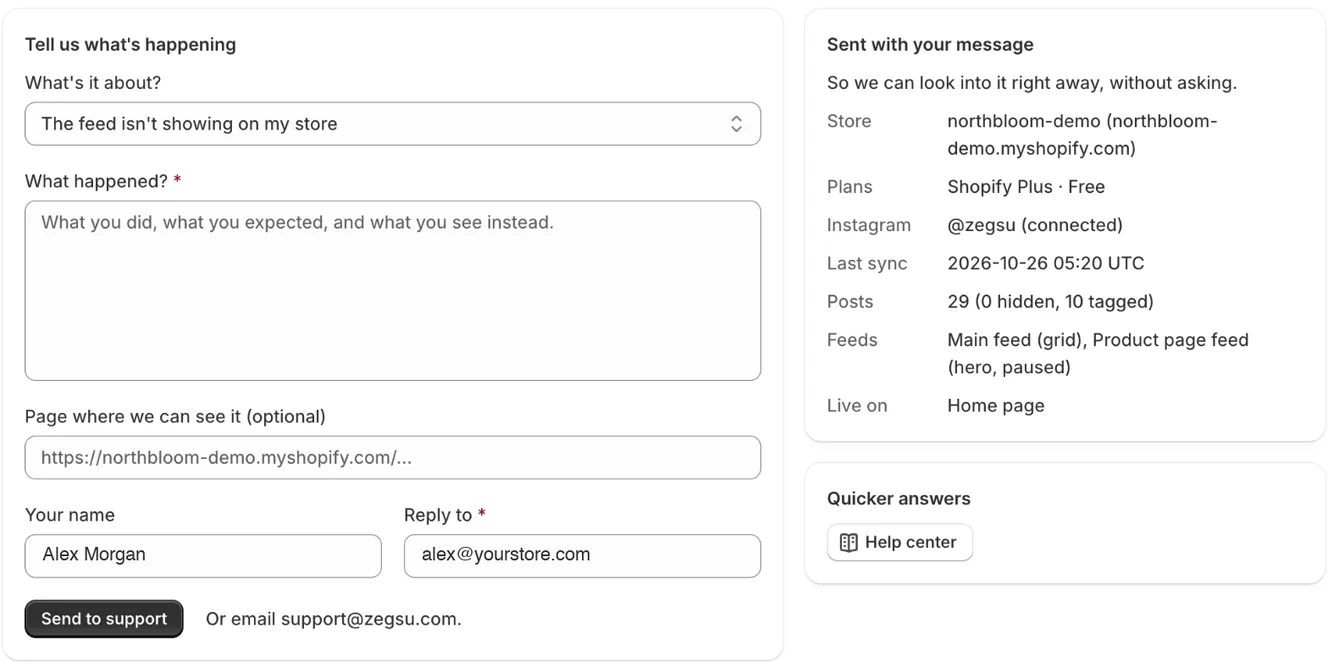
Support: describe the problem; your store details are sent with it -
Under What’s it about?, choose the closest topic.
-
Under What happened?, write what you did, what you expected and what you see instead.
-
Optional: paste the link to the page on your store where we can see the problem.
-
Check Your name and Reply to. We answer at the Reply to address.
-
Click Send to support. You see Thanks, we’ve got it.
What’s sent with your message
Section titled “What’s sent with your message”The Sent with your message box shows exactly what the app adds: your store and Shopify plan, your app plan, the connected Instagram account and its last sync, your posts and feeds, and the pages where your feed is live. Nothing else from your store is sent.
Other ways to get help
Section titled “Other ways to get help”- Click Help center on the Support page to open these articles at https://docs.zegsu.com/instagenie/.
- If Chat with us shows on the Support page, click it for an answer right away. If the question needs a person, the Zegsu team picks it up in the same chat.
- Email support@zegsu.com from your own email.
- Note: We usually reply within a day.
- Note: You can send one message a minute. If you forgot something, wait a moment and send another.
- Note: Pro includes priority support.
Related articles
Section titled “Related articles”Still having trouble? Contact us from Support inside Zegsu Instafeed and we’ll help you directly.