
How do I start the Pro free trial?
New stores start with Pro for 7 days automatically, no card needed. Home shows Pro trial: N days left. To keep Pro after that, open Plans and click Keep Pro after the trial; billing starts when the trial ends.
-
Click Plans in the app menu, or Keep Pro on the Home banner.
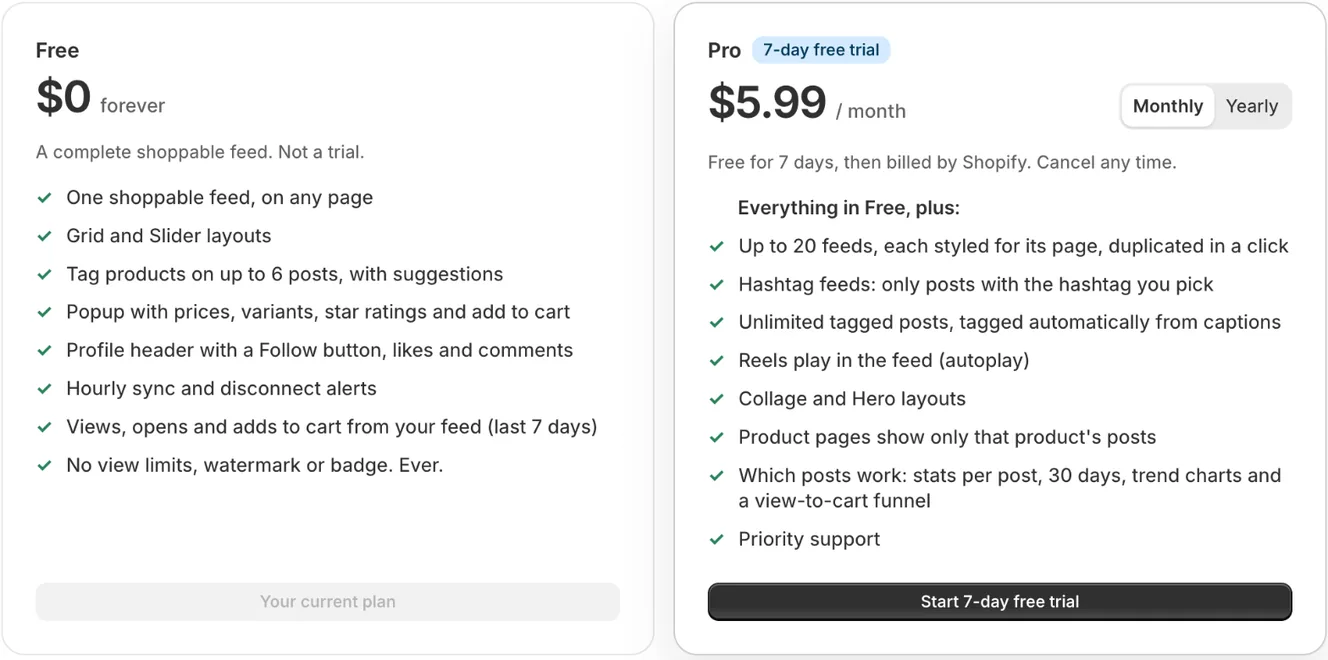
Free and Pro, with the Monthly or Yearly switch and the free trial button -
In the Pro card, pick Monthly ($5.99 a month) or Yearly ($29.99 a year).
-
Click Keep Pro after the trial. If your store isn’t in a trial, the button says Start 7-day free trial or, if it had a trial before, Upgrade to Pro.
-
On Shopify’s page, click Approve.
-
Back in the app, you see Pro is on. Your Pro layouts and feeds are live on your store.
- Note: During the 7-day trial everything in Pro is on: unlimited tagged posts, automatic tagging, Reels playing in the feed, every layout and feed, and stats for each post.
- Note: If you subscribe during the trial, Shopify starts billing when the trial ends, so you don’t lose any trial days.
- Note: If you do nothing, your store moves to Free on its own when the trial ends. Nothing is charged and nothing is deleted. Home then shows Your Pro trial has ended.
- Note: We email you two days before the trial ends.
- Note: Each store gets one trial. After it, the button says Upgrade to Pro and Shopify bills Pro from the day you approve it.
- Note: Stores that used the previous version of the app (Instagenie) don’t get the automatic trial. If you paid for it, you already have Pro.
- Note: Billing is through your Shopify bill, in USD.
Error states
Section titled “Error states”- Shopify couldn’t start the trial just now. Please try again. → Shopify didn’t create the charge. → Try again in a minute. If it keeps happening, contact support.
Related articles
Section titled “Related articles”- What do the Free and Pro plans include?
- How do I cancel Pro?
- What happens when I switch from Pro to Free?
Still having trouble? Contact us from Support inside Zegsu Instafeed and we’ll help you directly.