
How do I tag new posts automatically?
On Pro, open Settings and turn on Tag products automatically under New posts. From then on, when a new post’s caption names one of your products, the post is tagged with that product as it syncs.
-
Click Settings in the app menu.
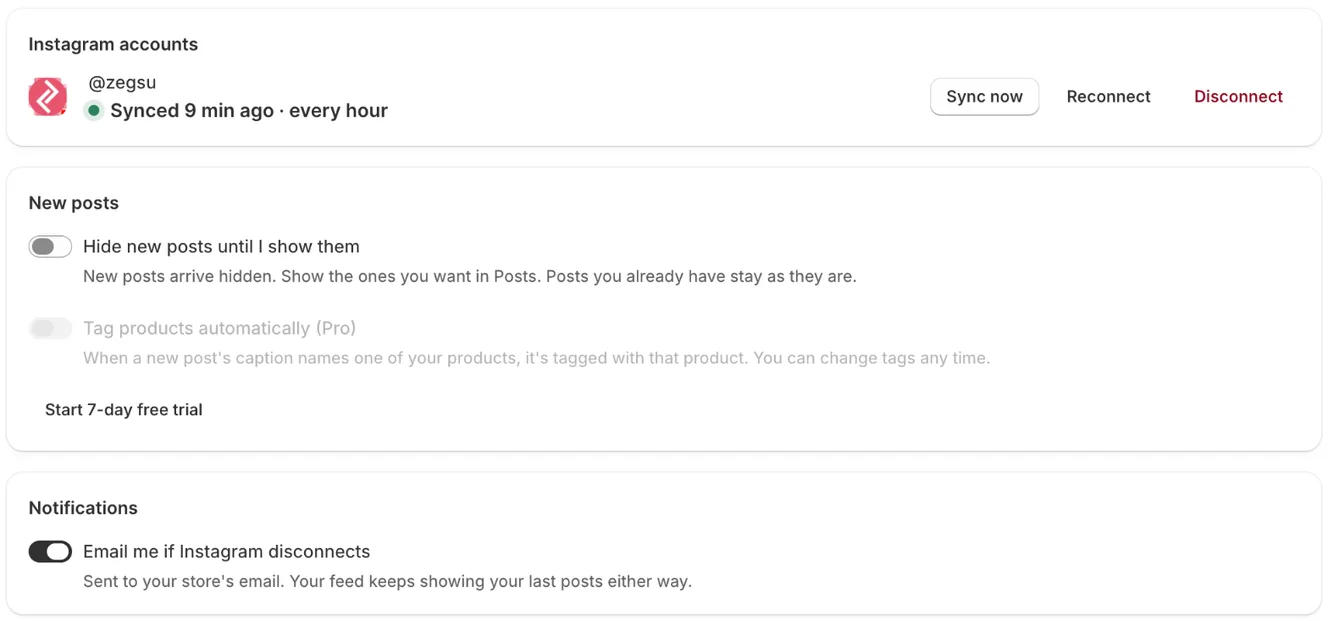
Settings: your Instagram account with Sync now, Reconnect and Disconnect, new-post options and notifications -
Under New posts, turn on Tag products automatically. You see New posts get tagged with the product their caption matches.
- Note: This is a Pro feature. On Free the switch is greyed out, with a Start 7-day free trial or Upgrade to Pro button.
- Note: New stores start with Pro for 7 days with this switch already on, so your first sync tags every post whose caption names one of your products.
- Note: It only tags new posts, and only ones without tags. It never changes tags you set.
- Note: Each post gets the one product its caption matches best. Add more products in Posts if you like.
- Note: Product tags you added inside Instagram (Instagram Shopping) aren’t read by the app.
Related articles
Section titled “Related articles”- How do I tag products on a post?
- How do I tag many posts at once?
- How do I start the Pro free trial?
Still having trouble? Contact us from Support inside Zegsu Instafeed and we’ll help you directly.