
How do I change the feed heading, width and padding?
These settings are in your theme editor, on the Instagram feed section. Each section on each page has its own.
-
Go to Online Store → Themes → Customize and open the page with the feed.
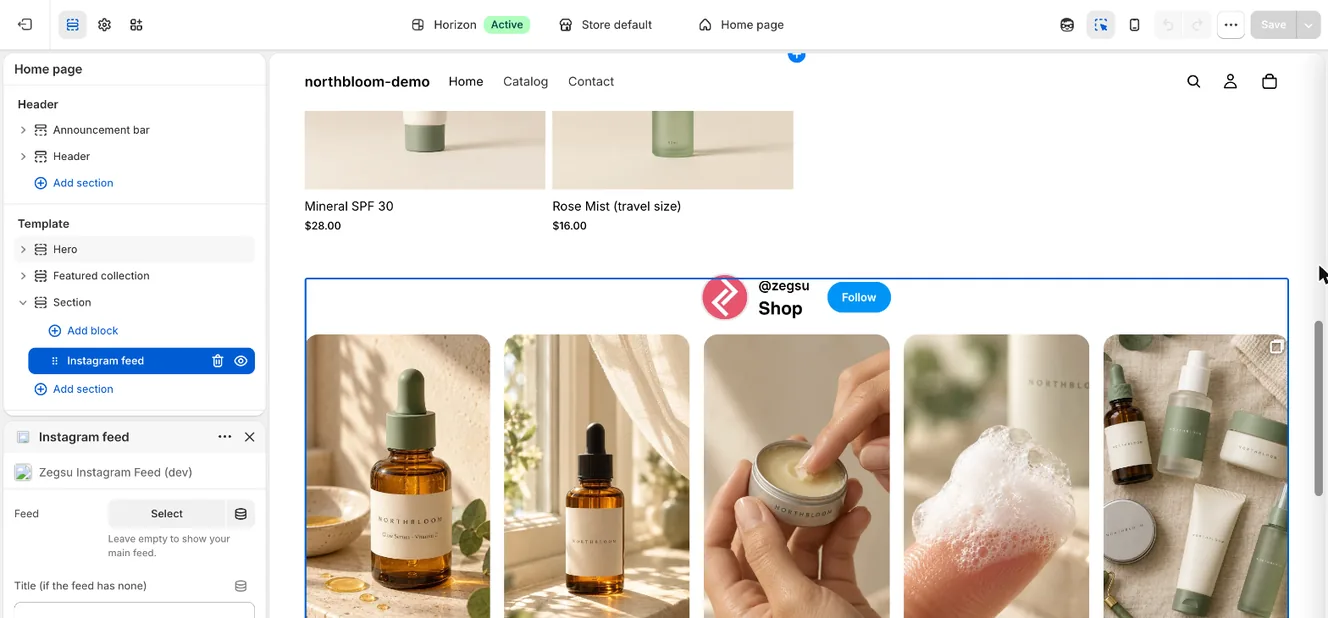
The Instagram feed block in the theme editor, with its Feed and Title settings -
Click the Instagram feed section.
-
Change the settings below, then click Save.
Section settings
Section titled “Section settings”- Feed: which feed to show. Empty means your main feed.
- Title (if the feed has none): used only when the feed’s Title in the app is empty.
- Heading font., Heading Size (10–30 px) and Heading Alignment (left, center, right).
- Feed Width: 50% to 100% of the page.
- Section Top Padding and Section Bottom Padding: 0 to 50 px.
- Note: Layout, tiles, popup and posts are set in the app, under Feeds.
- Note: Custom code (optional) says Only used by feeds from the previous version of the app. It has no effect on feeds made with this app.
Related articles
Section titled “Related articles”- How do I customize my feed?
- How do I show a different feed on each page?
- How do I add a title or a profile header with a Follow button?
Still having trouble? Contact us from Support inside Zegsu Instafeed and we’ll help you directly.